
SSD vs HDD: Making the Right Choice for Speed, Performance, and Storage
The digital landscape of computing is built upon the foundation of storage. Without it, our operating systems, applications, and precious data would cease to exist. For decades, optical disc drives (HDDs) have been the ubiquitous workhorses, offering vast capacities at an affordable price. However, the advent of solid-state drives (SSDs) has dramatically reshaped the storage paradigm. These innovative devices boast speeds and responsiveness that HDDs simply cannot match. Navigating this evolving storage landscape can be a complex undertaking. Knowing the core differences between SSDs and HDDs and how they translate to tangible benefits is crucial for making informed decisions about our computing needs. This exploration includes the core distinctions, their impact on various aspects of system performance, and the considerations that guide the choice between these two dominant storage technologies.
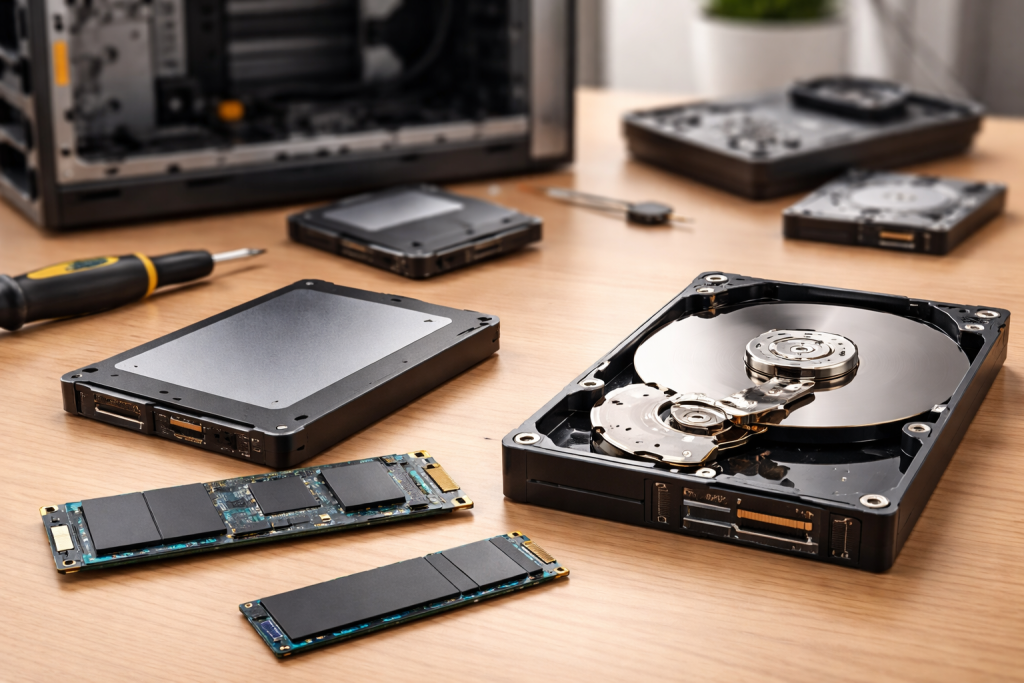
At the heart of the disparity between SSDs and HDDs lies their underlying technology. Each approach to data storage operates on fundamentally different principles, leading to a cascade of performance implications.
Contents
- 0.1 How HDDs Store Data
- 0.2 How SSDs Store Data
- 0.3 Boot-Up and Application Load Times
- 0.4 Data Transfer Speeds and Responsiveness
- 0.5 Capacity Requirements
- 0.6 Budget Constraints
- 0.7 Usage Patterns and Application Needs
- 0.8 Advantages of SSDs
- 0.9 Disadvantages of SSDs
- 0.10 Advantages of HDDs
- 0.11 Disadvantages of HDDs
- 0.12 Data Storage and Organization
- 0.13 Data Retrieval and Access Times
- 0.14 Gaming Performance
- 0.15 Multimedia Production
- 0.16 Price Per Gigabyte
- 0.17 Total Cost of Ownership
- 0.18 The Performance Boost for Older Systems
- 0.19 Factors Determining Value
- 0.20 The Hybrid Approach
- 0.21 System Drive vs. Storage Drive
- 1 FAQs
How HDDs Store Data
Traditional HDDs are mechanical devices. They store data on platters coated with a magnetic material, which spin at high speeds. A read/write head, similar to the stylus on a record player, hovers just nanometres above these platters. To access or write data, this head must physically move across the spinning platters to the correct sector. This physical movement, involving both rotational and linear motion, introduces latency—a delay inherent in the mechanical process. Think of it like finding a specific book in a massive library; you have to physically walk to the aisle, find the shelf, and then locate the book. The further the book is, the longer it takes. Due to their mechanical nature, HDDs are vulnerable to physical shock and vibration, which can damage the sensitive read/write heads.
How SSDs Store Data
SSDs, in stark contrast, are entirely electronic. They use NAND flash memory chips, which store data in blocks of electrical cells. There are no moving parts whatsoever. Data is accessed and written by electronically manipulating these cells. This lack of mechanical components translates to incredibly fast data access times because there’s no physical movement required. The computer electronics can instantly pinpoint and retrieve the required data, much like immediately accessing a specific line of text on a digital document without needing to physically turn to a page. This electronic nature also makes SSDs far more durable and resistant to physical shock.
The fundamental differences in how SSDs and HDDs store data have a profound and far-reaching impact on a computer’s overall speed and responsiveness. This is where the practical benefits of choosing one over the other become most apparent.
Boot-Up and Application Load Times
Perhaps the most immediately noticeable difference for any user is the impact on system boot-up and application load times. When you power on a computer, the operating system needs to be loaded from the storage device into RAM. Similarly, launching an application requires the program files to be read from storage. With an HDD, the mechanical head must seek the necessary data scattered across the platters, leading to a noticeable delay. Modern operating systems and complex applications contain millions of small files, each requiring individual access, amplifying this “seek time.”. An SSD, with its instant electronic access, can retrieve these files in a fraction of the time. This means your computer boots up in seconds rather than minutes, and your favourite programs open almost instantaneously. This dramatic improvement can fundamentally alter your daily computing experience, making your machine feel significantly more modern and efficient.
Data Transfer Speeds and Responsiveness
Beyond just booting and loading, the speed at which data can be read from and written to the storage device affects many other aspects of performance. Large file transfers, such as copying an operating system image, video files, or a batch of photos, will be vastly quicker with an SSD. Everyday tasks like saving documents, downloading files, or even browsing the web can benefit from the snappier response times of an SSD. Applications that frequently access and write data, such as video editing software, photo manipulation programs, or databases, will see a substantial performance boost with an SSD. The bottleneck in these scenarios is often the storage drive, and an SSD effectively removes that bottleneck, allowing other system components to perform at their best.
While the speed advantage of SSDs is undeniable, selecting the right storage solution isn’t always a straightforward decision. Several crucial factors come into play, balancing performance needs with budget and capacity requirements.
Capacity Requirements
One of the most significant considerations is how much storage space you need. Historically, HDDs have offered considerably higher capacities at a lower cost per gigabyte than SSDs. If you are an individual who stores vast amounts of data, such as extensive movie libraries, large RAW photo collections, or multiple operating system installations, an HDD might remain the more economical choice for bulk storage. Conversely, if your storage needs are more modest or you prioritise speed for your operating system and primary applications, an SSD might suffice. It’s important to assess your current usage and anticipate future needs to determine the appropriate capacity.
Budget Constraints
The cost of storage is a major deciding factor for most consumers. While SSD prices have steadily decreased over the years, they still generally command a higher price per gigabyte compared to HDDs. This means that for the same amount of money, you could purchase a significantly larger capacity HDD than an SSD. If budget is a primary concern, you might need to make a trade-off between raw capacity and performance. However, it’s also worth considering the long-term value. For many users, the performance gains and improved user experience offered by an SSD can be well worth the initial investment, especially when it comes to system drives.
Usage Patterns and Application Needs
Your intended use of the computer is paramount. A gamer will have different storage needs than a student writing essays or a professional video editor. For gaming, fast load times for game levels and quick installation of large game files are critical. Multimedia production, involving large video and audio files, benefits from high read/write speeds for rendering and editing. For general productivity tasks like web browsing, document creation, and email, the performance difference might be less dramatic but still noticeable. Understanding your typical workflow and the applications you rely on the most will help you prioritise storage performance.
To truly grasp the decision-making process, it’s essential to directly compare the strengths and weaknesses of each technology.
Advantages of SSDs
The primary advantage of SSDs is their unparalleled speed. This translates to significantly faster boot times, application loading, file transfers, and overall system responsiveness. They are also far more durable due to the absence of moving parts, making them less prone to damage from drops or bumps. SSDs are also silent and consume less power than HDDs, contributing to a quieter and potentially more energy-efficient system. Their faster access times can also lead to a smoother multitasking experience.
Disadvantages of SSDs
The main drawback of SSDs is their cost per gigabyte. For very large capacities, they remain more expensive than HDDs. While SSD technology has improved, they historically had a limited number of write cycles, meaning each cell could only be written to a finite number of times before degrading. However, modern SSDs have advanced wear-levelling algorithms that distribute writes evenly across the drive, significantly extending their lifespan to be comparable to or even exceed that of HDDs for typical consumer use. Data recovery from failed SSDs can also be more complex and expensive than from HDDs.
Advantages of HDDs
HDDs excel in offering massive storage capacities at an economical price point. This makes them an ideal solution for storing large amounts of data where speed is not the absolute top priority, such as in media archives, backups, or less frequently accessed files. They are also widely available and well-understood technologies.
Disadvantages of HDDs
The inherent mechanical nature of HDDs makes them significantly slower than SSDs. This results in longer boot times, slower application loading, and more sluggish file transfers. They are also more fragile and susceptible to damage from physical shock. HDDs produce audible noise from their spinning platters and read/write heads, and they consume more power and generate more heat than SSDs.
The fundamental function of both SSDs and HDDs is to store and retrieve data. However, their different operational mechanisms impact the efficiency and speed of these processes.
Data Storage and Organization
HDDs store data magnetically on physical platters. The operating system organises this data into files and folders, but the physical location of these files on the platter can become fragmented over time, meaning parts of a single file might be scattered across different areas. This fragmentation further exacerbates the search time issue for HDDs. SSDs store data electronically in NAND flash memory. While SSDs also have a logical structure for organising files, their random access capabilities mean that fragmentation, in the traditional HDD sense, is a much smaller performance concern. Data is accessed based on logical block addresses, and the controller can directly access any block without physical movement.
Data Retrieval and Access Times
The act of retrieving data is where the most significant divergence occurs. For an HDD, accessing data involves the read/write head physically moving to the correct track and sector on the spinning platter. This mechanical action is the primary cause of latency. For an SSD, retrieving data is an electronic process. The controller directly accesses the memory cells containing the data. This bypasses any mechanical delays, allowing for near-instantaneous access times, particularly for small, randomly located files. This capability is what makes SSDs so effective for tasks that involve frequent, small data accesses, such as operating system operations and application execution.
When it comes to demanding tasks like gaming and professional multimedia work, the choice of storage can make a tangible difference in your experience.
Gaming Performance
Gamers often prioritise fast load times for game levels, textures, and assets. A game installed on an SSD will load significantly faster than on an HDD. This means less time spent staring at loading screens and more time actually playing. Furthermore, some open-world games rely on streaming assets from storage as you explore, and an SSD’s faster read speeds can lead to a smoother and more immersive experience with fewer instances of texture pop-in or stuttering. While the actual in-game frame rates are primarily determined by your graphics card and CPU, an SSD’s ability to quickly deliver game data can prevent the storage device from becoming a bottleneck.
Multimedia Production
For professionals working with video editing, audio production, or complex graphic design, the storage drive plays a critical role. Large video files, high-resolution images, and extensive audio tracks demand substantial storage space and, more importantly, high read and write speeds. Rendering video, exporting audio, or applying complex filters can be time-consuming processes, and the efficiency of the storage drive directly impacts the overall workflow. An SSD will dramatically accelerate these operations, reducing waiting times and allowing for more fluid editing sessions. Scratch discs, temporary storage areas used by editing software, also benefit immensely from the speed of an SSD, preventing performance degradation during complex projects.
The financial aspect remains a key differentiator between these two storage technologies, influencing purchasing decisions for a wide range of users.
Price Per Gigabyte
As previously mentioned, the cost per gigabyte is where HDDs typically hold their advantage. For users who need to store a huge volume of data, such as terabytes of family photos, videos, or a comprehensive movie collection, purchasing an HDD is often the most cost-effective solution. A 4TB HDD can be significantly cheaper than a 4TB SSD, making it the preferable choice for bulk archival and storage needs.
Total Cost of Ownership
When considering the total cost of ownership, it’s also worth factoring in the performance gains of an SSD. For many users, the productivity and time savings afforded by an SSD can translate into a positive return on investment. Less time spent waiting for the computer to boot or applications to load translates to more time spent on productive tasks. Furthermore, the increased durability of SSDs can mean fewer replacement costs over the long term, especially in mobile computing environments.
For many users who are still relying on traditional HDDs, the question of whether to upgrade to an SSD is significant. The answer often hinges on their current system and their expectations.
The Performance Boost for Older Systems
Upgrading to an SSD can revive a computer that is several years old but still relies on an HDD as its primary drive. The performance improvements can be so dramatic that they can make an older machine feel significantly faster and more responsive. This can be a far more cost-effective solution than purchasing an entirely new computer, especially for basic tasks like web browsing, email, and office applications.
Factors Determining Value
The value of an SSD upgrade depends on several factors. If your current system is already quite powerful with a robust CPU and ample RAM but is held back by a slow HDD, the upgrade will yield the most significant results. If you primarily use your computer for demanding tasks that are storage-intensive, the investment will be more justified. For users who only perform basic tasks and don’t frequently encounter long loading times, the upgrade might be less impactful. It’s also important to determine the capacity you need for your SSD upgrade.
Ultimately, the ideal storage solution is often not an “either/or” proposition but rather a strategic blend of both technologies, leveraging the strengths of each.
The Hybrid Approach
A very common and highly recommended approach for many users is a hybrid storage setup. This typically involves installing a smaller, faster SSD as the boot drive for your operating system and frequently used applications. Complementing this, a larger, more affordable HDD is used for bulk storage of documents, media files, games, and backups. This configuration combines the benefits of an SSD’s lightning-fast responsiveness and quick boot times for daily use with the massive storage capacity and cost-effectiveness of an HDD for less critical data.
System Drive vs. Storage Drive
In this hybrid model, the SSD serves as a “system drive” or “primary drive,” housing the operating system, key software, and any applications you want to load quickly. The HDD then functions as a “storage drive” or “secondary drive,”, perfect for storing large files that don’t require immediate access or for archiving purposes. This intelligent role partitioning ensures a consistently snappy system while also providing ample space for all your digital needs, all at an affordable price. By carefully considering your individual needs and balancing the advantages of both SSDs and HDDs, you can create a storage solution that optimises performance and capacity for your computing experience.
FAQs
1. What is the difference between SSD and HDD?
SSD (Solid State Drive) and HDD (Hard Disc Drive) are both storage devices, but they differ in terms of technology, speed, and performance. SSDs use flash memory to store data, while HDDs use spinning discs and a mechanical arm to read and write data.
2. How do SSD and HDD affect system boot-up and application load times?
SSDs are significantly faster than HDDs when it comes to boot-up and application load times. This is because SSDs have faster read and write speeds, resulting in quicker access to data and faster overall system performance.
3. What are the advantages and disadvantages of SSD and HDD?
SSDs offer faster performance, lower power consumption, and more durability due to the lack of moving parts. However, they are typically more expensive per gigabyte compared to HDDs. HDDs are slower but offer larger storage capacities at a lower cost.
4. Which is better for gaming and multimedia, SSD or HDD?
SSDs are better for gaming and multimedia due to their faster load times and data access speeds. This results in smoother gameplay, faster level loading, and quicker file transfers for multimedia content.
5. Is upgrading to SSD worth the investment?
Upgrading to an SSD can significantly improve system performance, speed, and responsiveness. While SSDs are more expensive than HDDs, the investment is often worth it for those seeking faster overall system performance and quicker access to data.

With over 5 years of experience in digital learning and productivity, we specialize in creating practical and easy-to-follow solutions.Our expertise focuses on simplifying complex concepts into clear, actionable strategies for everyday use.We are committed to helping learners and professionals improve efficiency, build skills, and achieve consistent growth.